DIGI HAM LINK login password
Used with your callsign to sign in to this application. Shared members need this password, but not an AllStar node password.
The operating path
A straightforward process with an important checkpoint: administrator approval. Your app password and your AllStar node registration password serve different purposes.
On the application sign-in page, choose Register new account. Administrator approval is required.
Open the application and choose Register a new account. Enter your name, callsign, email and DIGI HAM LINK password. Callsigns use letters and numbers without slashes; new user passwords require at least eight supported characters.
Shared access does not require your own AllStar credentials. Personal-node access requires your node number, registration password and authorization to host it. Choose the option that matches your intended use.
Check the highlighted fields and correct missing information without starting over. If license uploads are enabled, provide a readable official license image or PDF according to the displayed policy. The maximum document size is 10 MB.
The received-registration confirmation means the request is saved for review. You cannot sign in until approval is complete. Review time is not guaranteed; an email notice depends on the server’s email configuration.
Use your callsign and DIGI HAM LINK password at the secure application address. Shared accounts connect to their assigned room after sign-in when automatic connection is enabled. If needed, use Start radio or Reconnect audio and check the connection status.
Allow microphone access, choose an available audio device and check your levels. Listen for a clear channel, press and hold PTT, identify and speak, then release to listen. Connection does not mean the microphone is transmitting continuously.
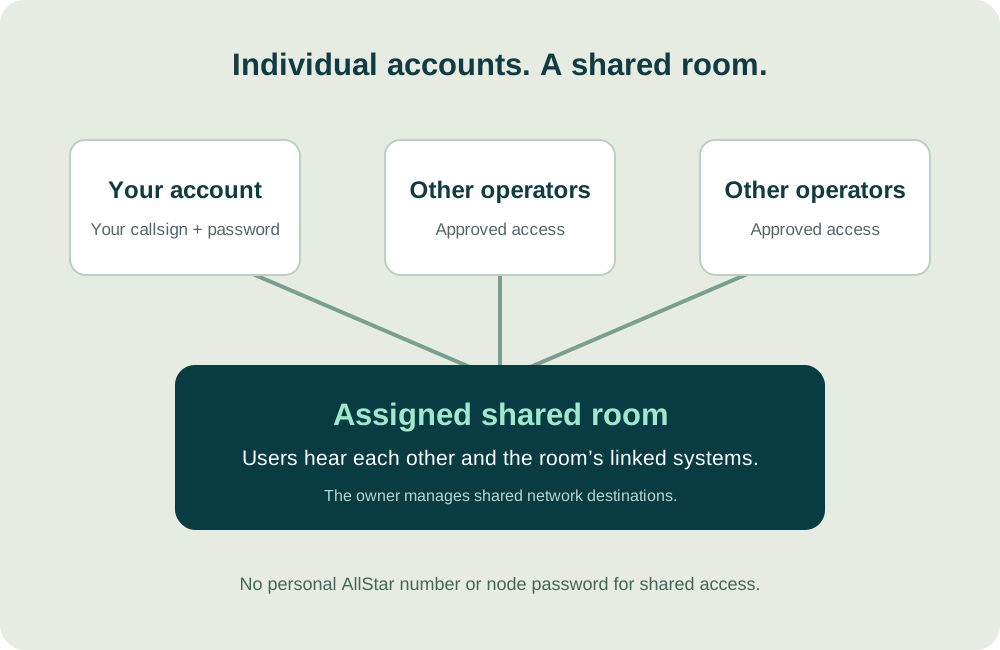
The assigned room and its server-side network connections.
Your account is individual, but the room’s linked nodes and selected DMR group are common to its users. Closing your browser ends or interrupts your own audio session; it does not inherently remove the room’s server-side links.
Used with your callsign to sign in to this application. Shared members need this password, but not an AllStar node password.
Needed only for a requested personal node that will be hosted on the server. It is a node credential, separate from the application login.
Start with your callsign
Request an account, wait for approval, and explore the systems linked to your assigned room. Shared access does not require your own AllStar node credentials.
For licensed amateur radio operators. Approval is required before you can sign in. Available controls depend on your account permissions and configured bridges.